eBay Photo Requirements Guide 2026: Sizes, Zoom, Rules
eBay photo requirements for 2026: the 500 px floor, the 1600 px zoom target, the 12 MB cap, the watermark ban, and what compliant exports really weigh.

Contents
- The hard floor and the soft recommendation
- Every number on eBay’s own pages
- The zoom threshold nobody can source
- File formats: HEIC and AVIF upload as-is
- What a compliant export actually weighs
- eBay’s built-in editor, then the browser tools
- Backgrounds: white by default, dark for shiny items
- Main photo rules that bite mid-auction
- eBay photo requirements: quick answers
- What size do eBay photos need to be?
- Does eBay allow watermarks on listing photos?
- Can I upload HEIC photos from an iPhone directly to eBay?
- Can I change my eBay main photo after listing?
eBay’s photo requirements in 2026 reduce to five numbers: at least one photo per listing, 500 pixels minimum on the longest side, roughly 1600 x 1600 recommended, 12 MB maximum per file, and up to 24 pictures. The uploader accepts JPEG, PNG, GIF, TIFF, BMP, WebP, HEIC, and AVIF. Borders, added text, and watermarks of any kind violate the picture policy, and enforcement can escalate to account suspension.
The hard floor and the soft recommendation
Most seller guides blur two different things. The floor is policy: the picture policy lists “at least one photo that is 500 pixels on the longest side” as a requirement, alongside a ban on placeholder images and on stock photos for used or damaged items. Break those and eBay’s stated responses run from removing the listing to restricting or suspending the account.
The 1600 number lives on a different page with different force. eBay’s photo help states that images “should have a minimum resolution of 500 x 500 pixels” and recommends “about 1600 x 1600,” with 1:1 or 16:9 framing looking best across search and listing placements. A 900-pixel photo lists fine (the floor is the only line eBay enforces). It just gives buyers less to look at.
Which side of the floor you’re on decides the fix. eBay’s built-in photo editor covers crop, rotate, background, brightness, and contrast, so a large photo that merely needs reframing never has to leave the listing form.
The editor can’t add pixels a photo never had, though. When your only shot of a sold-out item measures 450 pixels on its long side, Araluma Upscale 2x doubles it to 900 in the browser, clearing the floor with room to spare.
Every number on eBay’s own pages
The specs below all come from eBay’s current help and policy pages, with the load-bearing distinction marked: policy gets enforced, recommendations just cost you conversions.
| Spec | Number | Status |
|---|---|---|
| Minimum resolution | 500 px on the longest side | Policy, enforced |
| Recommended resolution | About 1600 x 1600 px | Recommendation |
| File size cap | 12 MB per photo | Uploader limit |
| Photos per listing | 1 required, up to 24 allowed | Platform limit |
| Aspect ratio | 1:1 or 16:9 | Recommendation |
| Photo storage after a listing ends | 90 days | Platform behavior |
| Gallery Plus hover preview | Up to 400 x 400 px, vs 96 px standard | Paid upgrade |
Two of these earn a note. The 90-day window means a relist can reuse the photos you already uploaded, so a seasonal seller doesn’t reshoot every spring. And Gallery Plus quadruples the search-results preview, which matters for texture-heavy categories like rugs or vintage denim where a 96-pixel square reads as mud.
The zoom threshold nobody can source
Here’s what surprised me while checking sources for this guide: eBay’s own pages never state a zoom activation number. The help article recommends 1600 x 1600 and stops. Meanwhile third-party seller guides confidently publish thresholds, and they disagree with each other. One popular handbook claims zoom only activates at 1600 pixels on the longest side; another widely shared guide puts the working range at 800 to 1600. Neither cites an eBay page, because no current eBay page says it.
My advice: export at 1600 on the longest side (which sits at or above every threshold the guides claim) and the whole argument becomes irrelevant. The one case where I’d break the rule is a source photo that’s natively smaller, say 1200 pixels. Upscaling it by a third just to chase an unverified zoom number trades real sharpness for a maybe-feature. Keep the honest 1200.
File formats: HEIC and AVIF upload as-is
The accepted-format list is longer than most sellers assume: JPEG, PNG, GIF, TIFF, BMP, WebP, HEIC, and AVIF, per eBay’s troubleshooting section. That means the HEIC files an iPhone shoots by default go straight into the uploader with no conversion step, and so do AVIF exports from modern tools.
I still standardize on JPEG for listing work, with one concrete reason: reuse. The same product shot tends to end up in an email to a buyer, a Depop or Facebook Marketplace cross-post, or a print-at-home return label sheet, and JPEG is the one format in that list none of those destinations rejects. Converting at export costs nothing; discovering a cross-post form that refuses HEIC at 11 pm costs a listing night.
What a compliant export actually weighs
I put a 24-megapixel test shot through the whole spec ladder to see how scary the 12 MB cap really is. The source: a 6000 x 4000 JPEG of a polished silver sphere on dark glass, 2.81 MB straight off the camera. That’s 22 percent of the cap before any optimization. You would need a TIFF or an absurdly high-quality export to actually hit 12 MB with a photo.
Downsizing to eBay’s recommended sizes made the numbers almost comical. At 1600 pixels on the longest side, the JPEG landed at 133 KB; center-cropped square to 1600 x 1600 it weighed 179 KB. The 800-pixel version came out at 51 KB and the bare-minimum 500-pixel version at 28 KB. The resize itself took under half a second on commodity hardware.
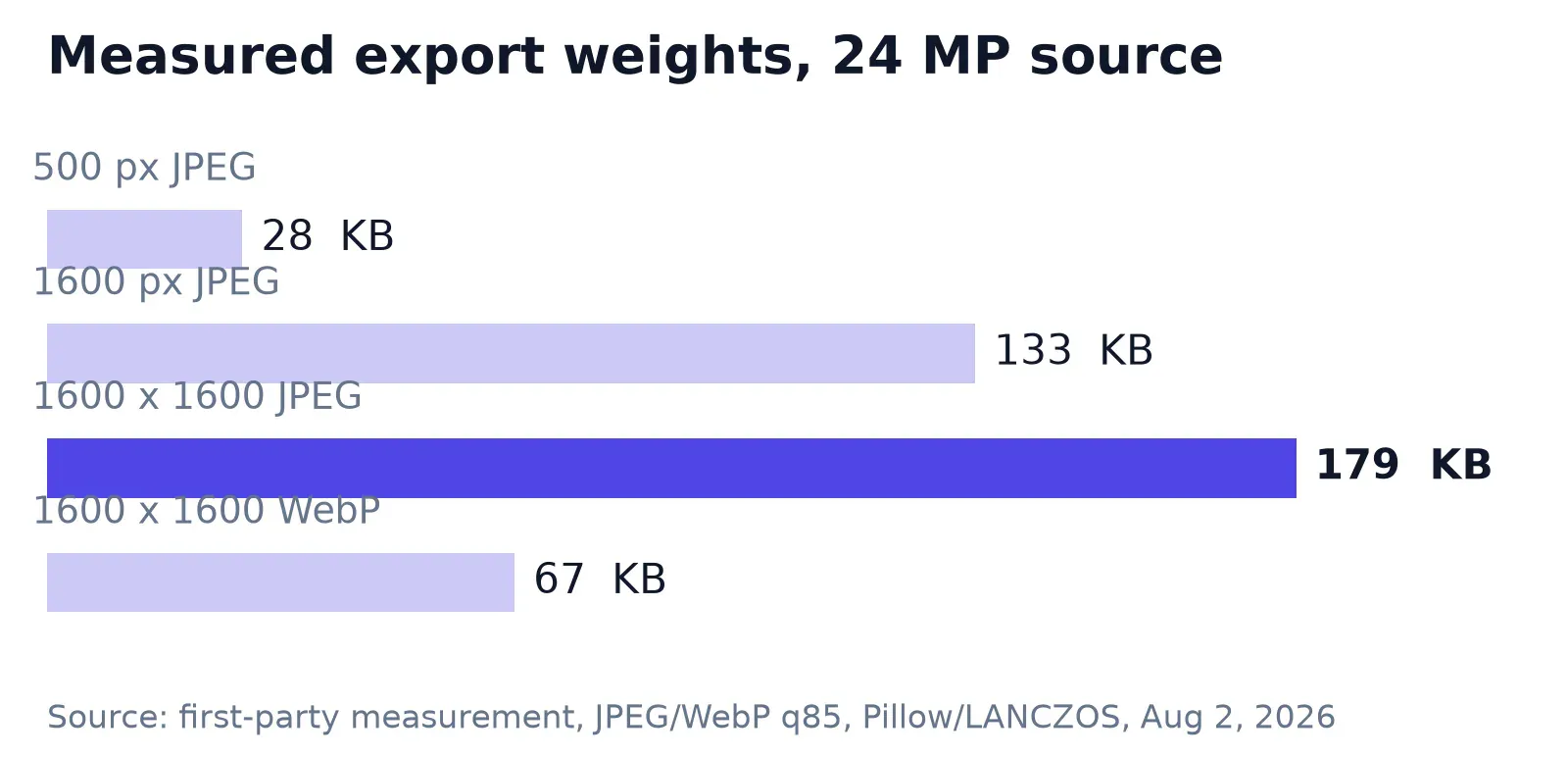
The same 1600-square frame saved as WebP at matching quality weighed 67 KB, roughly a third of the JPEG. Tempting, and eBay accepts it. I still ship the JPEG for the reuse reasons above, but when a listing carries all 24 photos and you’re uploading over hotel Wi-Fi, compress the export with a live quality preview and pick the format that fits the job.
eBay’s built-in editor, then the browser tools
Start inside the listing form. The edit screen crops, rotates, and adjusts brightness and contrast, and the Background icon replaces the backdrop with solid white in one click on the web tool. The eBay app goes further, offering AI-generated backgrounds it calls Studio, Surface, and Outside, with an option to generate more variants until one fits.
The editor’s gaps show up at scale. It works one photo at a time, white is the only background choice on the web version, and a pixel-exact resize isn’t among the listed edits, so you can’t type 1600 and get a guaranteed dimension.
For the exact-dimension step, open the image resizer in the browser and type 1600 into the dimension field directly. For a source photo that’s genuinely too small rather than badly framed, the harder cases and their fixes are covered in our guide to enlarging images without quality loss.
Backgrounds: white by default, dark for shiny items
eBay’s guidance here is more nuanced than the usual “white background” mantra. White is called generally best, with a stated exception: for shiny or reflective items like jewelry, a darker background may work better. My test image above is exactly that case, a silver sphere shot on dark glass, and it’s the kind of product where a pure-white sweep bounces the item’s own reflections into blown highlights.
For everything matte, white remains the move, and you have two paths to it. eBay’s Background icon gets you a serviceable white in one tap. When the item has fine edges the one-tap tool tends to eat, swap the background in the browser and export a clean cutout instead.
Fraying edges around hair, fur, and glass are their own topic. We covered the repair workflow in eBay background removal edges, including the shadow checks that keep a cutout from floating.
Main photo rules that bite mid-auction
The first photo you upload becomes the main photo, the one buyers see next to your title in search results. eBay wants it face-on, showing the whole item, and for single-item listings it should show no variations. Bundles flip the rule: the main photo must show everything included.
The swap window is the detail that catches auction sellers. You can change the main photo on a fixed-price listing only while it has no offers, and on an auction only with no bids and more than 12 hours left. Notice a better angle after the first bid lands and the main photo is locked for the duration.
Two smaller rules do quiet conversion work. eBay explicitly asks for close-ups of any flaws or scratches (framing them as return prevention rather than a sales risk). And when scale is ambiguous, the official tip is to shoot the item next to a coin or ruler, which beats a paragraph of dimensions for a buyer skimming on a phone.
Selling the same item across marketplaces? Each one crops differently, and the specs don’t transfer. The square-first logic behind Depop specs is stricter than eBay’s, since every Depop photo displays square.
Etsy runs a different trap again, with a thumbnail safe zone that eBay doesn’t have. The export targets in our guide to Etsy photos show why a one-export-fits-all workflow eventually clips something that mattered.
eBay photo requirements: quick answers
What size do eBay photos need to be?
At minimum, 500 pixels on the longest side, which is enforced policy. eBay recommends about 1600 x 1600 pixels for detail and zoom, with 1:1 or 16:9 aspect ratios displaying best. Each file must stay under 12 MB, and a listing holds up to 24 photos.
Does eBay allow watermarks on listing photos?
No. The current picture policy bans watermarks of any type, including ownership attributions, along with added borders, text, artwork, and marketing material. Older seller guides still describe tolerated watermark sizes, but no such allowance appears in the policy today, and violations can lead to listing removal.
Can I upload HEIC photos from an iPhone directly to eBay?
Yes. eBay’s uploader accepts HEIC, alongside JPEG, PNG, GIF, TIFF, BMP, WebP, and AVIF, so iPhone photos need no conversion before listing. Consider converting to JPEG anyway if you reuse the same photos on other platforms, since some cross-posting destinations still reject HEIC files.
Can I change my eBay main photo after listing?
Only within a window. Fixed-price listings allow a main-photo change while there are no offers. Auctions allow it while there are no bids and more than 12 hours remain. Once a bid or offer exists, the main photo stays fixed until the listing ends.
My export preset for eBay, after running the numbers: crop square, resize to 1600 x 1600, save as JPEG at quality 85, and expect roughly 180 KB per photo. That preset clears every rule on eBay’s pages and every threshold the third-party guides argue about. The one thing it can’t survive is a policy change, so when a number here matters to your listing, the two eBay pages linked above are the ones to recheck.


