Poshmark Photo Sizes 2026: Covershot, Listing Grid, Uploads
Poshmark covershots now display as 3:4 portraits, not squares. Get the official specs, my measured CDN sizes, and a prep flow that keeps items in frame.

Contents
- The numbers Poshmark publishes (and the ones it won’t)
- What changed in March 2026
- What Poshmark’s CDN actually serves
- Framing for a 3:4 frame
- The covershot background and the other 15 slots
- Poshmark photo FAQ
- Does Poshmark still accept square photos?
- What size should Poshmark photos be?
- How many photos can a Poshmark listing have?
- Should I update old listings to portrait covershots?
- Does Poshmark compress your photos?
Poshmark changed the frame in March 2026: covershots now display as 3:4 portraits in feed and search instead of 1:1 squares. Existing square photos stay valid, with the original visible on the listing details page. A listing takes up to 16 photos and one video, and every full-size image Poshmark served in my probe topped out at 1000 pixels wide.
You can get to 3:4 without installing anything. Google Photos on Android documents the path: Edit, then Crop, then the Aspect ratio icon, and its Save as copy option keeps the original untouched. The catch is precision: you drag a box by eye, one photo at a time, and there is no field where you type the pixel dimensions you want.
When a whole rail of inventory needs the same frame, the browser-based crop image tool takes aspect presets plus typed dimensions, so every export lands at the exact same 3:4 geometry instead of sixteen slightly different eyeballed crops.
The numbers Poshmark publishes (and the ones it won’t)
Poshmark is talkative about counts and quiet about pixels. Here is the whole spec picture, with the source of each number labeled, because half of what circulates in seller groups is folklore.
| Spec | Value | Where it comes from |
|---|---|---|
| Covershot display ratio | 3:4 portrait | Official, announced March 25, 2026 |
| Older covershots | Stay 1:1; original opens from the listing page | Official |
| Photos per listing | Up to 16 | Official |
| Videos per listing | 1 | Official |
| Official pixel requirement | Not published | Absent from Poshmark’s own guides |
| Largest image actually served | 1000 px wide | My measurement, August 1, 2026 |
| Sane upload target | 1200×1600 (3:4) | Arithmetic on the ratio, not a rule |
That last row deserves the caveat. 1200×1600 is simply 3:4 with comfortable headroom above the 1000-pixel ceiling I measured; nobody at Poshmark blessed it. Treat it as a floor for sharpness, and stop exporting 4000-pixel files for a marketplace that will never show them. If you cross-list, the Depop guide walks this same spec table for a marketplace that stayed square.
What changed in March 2026
Poshmark announced the portrait format on March 25, 2026, describing the 3:4 ratio as “taller than it is wide” and rolling it out gradually. Covershots now render as portraits where browsing happens, in the feed and in search results.
Two details in that announcement matter more than the ratio itself. First, nothing breaks for older listings: the square files stay attached, and a shopper who opens the listing page still sees the photo as uploaded. Second, migration is voluntary; Poshmark frames updating older covershots as a choice, “not required.”
My position: leave a closet with hundreds of live listings alone and go portrait on everything new. The old squares keep selling while the new frame fills your first rows, which is where a buyer’s attention actually sits.
The announcement also carries Poshmark’s own framing advice for the new shape:
- Center the item vertically and horizontally so it reads well in the feed.
- Leave slight space around the edges.
- Show the full item, without cutting hems, sleeves, or straps.
That second point is just whitespace doing its job. A garment that touches the frame edge looks cropped even when it isn’t.
What Poshmark’s CDN actually serves
Guides argue about upload sizes while ignoring the measurable half of the question: what does Poshmark deliver back? On August 1, I pulled seven covershots from Poshmark’s public category pages, grabbed each size variant the image CDN exposes, and measured the files. Every one of them, square or portrait, capped at 1000 pixels wide.
| Variant | Square listing | Portrait listing |
|---|---|---|
| Small | 300×300 | 286×380 |
| Medium | 580×580 | 551×733 |
| Large | 1000×1000 | 1000×1329 |
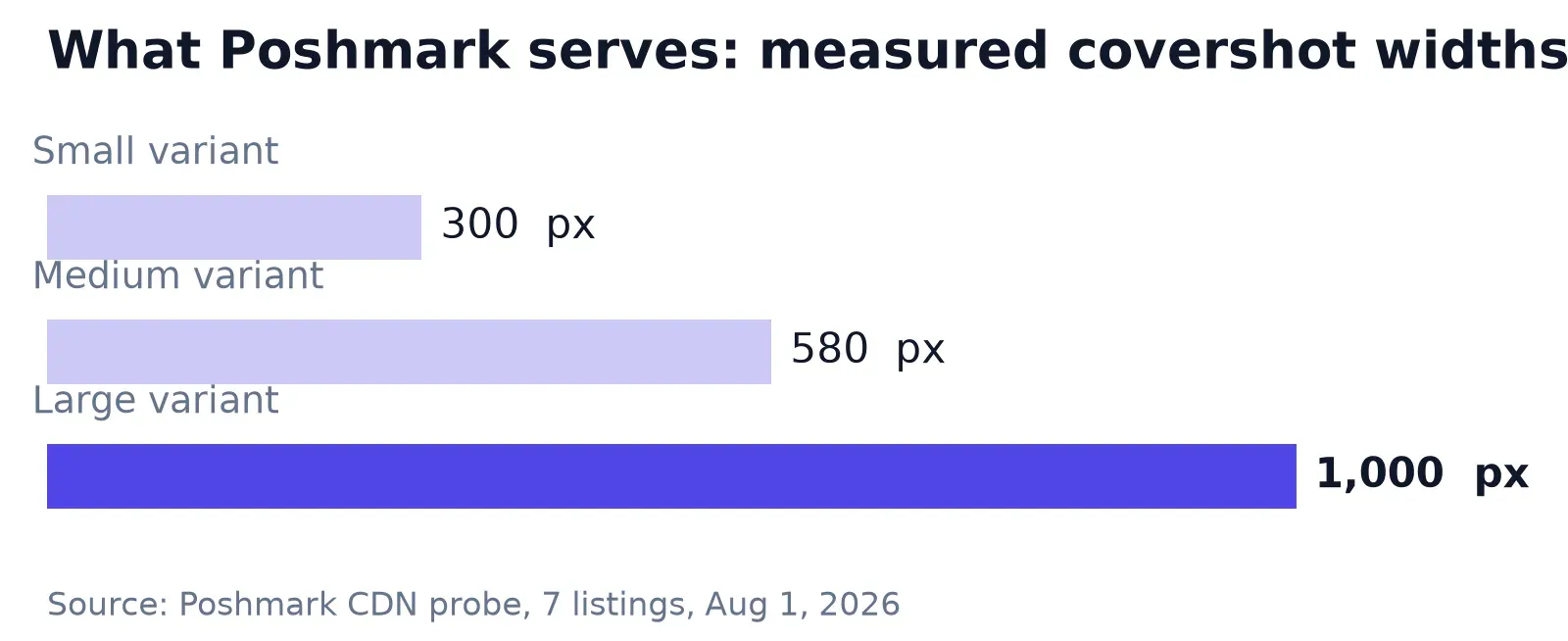
The served JPEGs in my sample ranged from about 15 KB for a small thumbnail to 474 KB for a heavy full-size image, and the CDN offers WebP versions of the same files alongside (which settles it: Poshmark re-encodes whatever you hand it). Uploading a pristine 8 MB export doesn’t reach buyers; a clean, sharp file at reasonable dimensions does.
The sample told me something else: six of the seven covershots were still square, including listings posted in late July. Four months after the announcement, most sellers haven’t moved. A portrait covershot is currently a differentiator, which is the polite way of saying the field is slow.
One honest limit: seven listings is a probe, not a census, and I can only see what the CDN serves, not what Poshmark stores internally.
Framing for a 3:4 frame
Here’s the convenient part. Most phone cameras shoot 4:3 by default (which, held upright, is exactly the 3:4 Poshmark now wants), so a photo taken in portrait orientation already has the right shape. For new shots, the job isn’t cropping at all; it’s composing with margin so the item sits inside the frame with room to breathe.
Existing files need arithmetic instead. A 2:3 portrait from a mirrorless camera, say 2000×3000, trims to 2000×2667 for 3:4, keeping 88.9% of its height. Your old square inventory gives up more: a 2000×2000 covershot recomposed to portrait keeps a 1500-pixel-wide strip, 75% of the image, so anything near the left or right edge is gone.
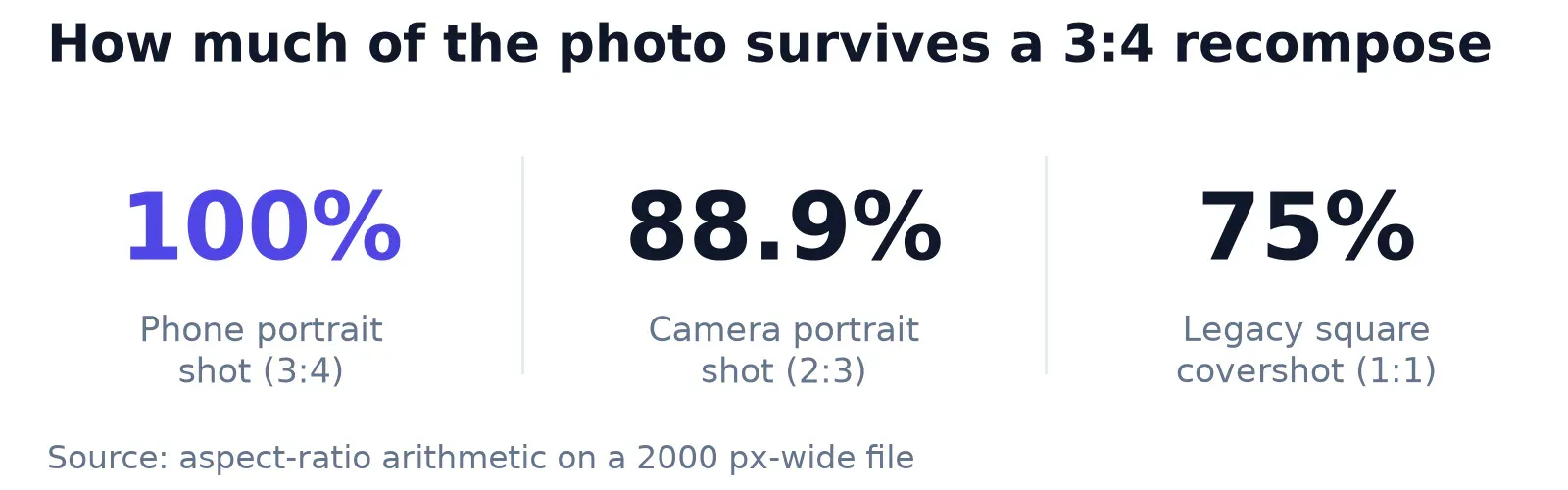
Landscape files fare worst of all. A 16:9 frame, say 3200×1800, yields only a 1350-pixel-wide column once you cut a 3:4 portrait from it, 42.2% of the width, which is why a wide flat lay rarely survives as a covershot. Shoot those again in portrait, or accept that the crop will pick one subject and discard the rest.
Poshmark’s own app editor handles the last mile. The 2020 photography guide notes the in-app crop lets you “pinch to zoom out so your whole item is in the frame,” which rescues a single covershot on your phone. It edits one photo at a time by eye, though, with no way to type a dimension.
That math is why I prep at fixed dimensions rather than by feel. Set 1200×1600 once, resize to exact pixels, and the whole batch comes out geometrically identical.
The habit transfers. It’s the same discipline I use when resizing Etsy listing photos, where the first image also dictates the shapes of everything after it.
A landscape-heavy archive usually needs 4:3 crops for other destinations anyway, a cousin of this problem with its own rules, and stretching is never the answer to either one.
The covershot background and the other 15 slots
Poshmark’s listing photography guide keeps the covershot brief: product focused, on a white or simple background. It also warns about light sources, noting that most household bulbs cast a warm yellow that shifts the item’s color. Natural window light or a ring light reads truer, and on resale, color accuracy is a returns problem, not an aesthetics preference.
A cluttered background is fixable after the shot. Araluma’s background remover cuts the item out in the browser and exports a flattened JPEG on white, which is exactly the covershot Poshmark describes. Check the edges before you upload, though; AI cutouts still trip up on mohair, mesh, and frizzy knits.
I covered the eBay edge cleanup separately, and every check there applies to a Poshmark covershot too.
The remaining slots are documentation, not decoration. Poshmark’s guide asks for angles that show condition issues, the tag for sizing reference, scale comparisons, and texture close-ups. Buyers on Shopify listing backgrounds expect studio polish; resale buyers expect evidence. A visible flaw photographed honestly closes sales that a suspiciously perfect grid loses.
Poshmark photo FAQ
Does Poshmark still accept square photos?
Yes. The March 2026 change is about display, not validation. Square covershots render in the portrait feed, and the original 1:1 file stays available on the listing details page. Poshmark explicitly says updating older listings to portrait is optional, so nothing forces a reshoot of your existing closet.
What size should Poshmark photos be?
Poshmark publishes no pixel requirement. In my August 2026 measurement, the largest file the platform served was 1000 pixels wide, square or portrait. A 3:4 export around 1200×1600 clears that ceiling with margin for sharpness; anything much larger spends storage and upload time on pixels no buyer receives.
How many photos can a Poshmark listing have?
A listing takes up to 16 photos plus one video. The covershot fills the first slot and carries the feed impression; the other 15 exist for condition, tags, scale, and texture. Sellers who fill most slots are giving buyers the inspection a fitting room would.
Should I update old listings to portrait covershots?
Poshmark leaves this to you; updating existing covers is explicitly optional. My rule is effort-based: a closet with hundreds of live squares keeps selling as is, while anything you list from now on goes portrait. Reserve reshoots for the listings you’re already relisting or repricing anyway.
Does Poshmark compress your photos?
The files buyers see are re-encoded. My probe found the same covershot delivered as JPEG and WebP in three sizes, capped at 1000 pixels wide, with weights from roughly 15 KB to 474 KB. Upload a clean, well-lit file at sane dimensions and let the pipeline do its work.
Next listing you photograph, try the order this article implies: portrait orientation first, margin around the garment, white or plain backdrop, then a fixed 1200×1600 export for the whole batch. The part I can’t measure for you is drift. Poshmark re-specs quietly, my seven-listing probe was one Saturday’s snapshot, and the feed will show the next change before any guide does, so glance at how covershots render before you prep the next fifty.


