Crop Product Photos for Marketplace Thumbnails
Crop product photos for marketplace thumbnails with a three-frame safe zone, cleaner exports, and a quick small-screen check before upload.

Contents
Crop product photos for marketplace thumbnails by starting with one wider master image, centering the sellable part of the product, and checking it in square, portrait, and landscape frames before you export. That extra preview catches the handle, label, or edge detail a listing thumbnail will quietly cut off. Resize only after the crop survives those three views.
The platform crop first
For one listing, use the marketplace’s own crop and thumbnail controls first. They show the final placement in the context where shoppers will see it, which is more useful than guessing from a desktop-sized original. The catch is that a saved crop can be hard to reverse; Etsy says restoring it requires uploading the original again.
Keep a full-resolution master in a separate folder, then duplicate it for the listing. Start with the first photo because that image becomes the thumbnail. If the product reads clearly at a small size, leave the detail shots to explain texture, scale, and alternate angles. The thumbnail sizing guide is the useful next stop when the file also needs a specific pixel size.
A three-frame safe zone
The safe zone is the portion of the product that remains intact when the same source photo is shown as a square, a portrait, or a landscape thumbnail. Center the item’s important edges inside the smallest frame, then let the wider frames carry the background. A centered product with breathing room is safer than a dramatic close crop that only works once.
Etsy’s current guidance is unusually direct: it asks sellers to keep the subject clear in all three views. It also recommends at least 2,000 pixels in both directions for listing photos, and its first listing image needs a 635-pixel width and height floor. Those are useful constraints, but they do not decide the crop for you. The frame has to protect the product first.
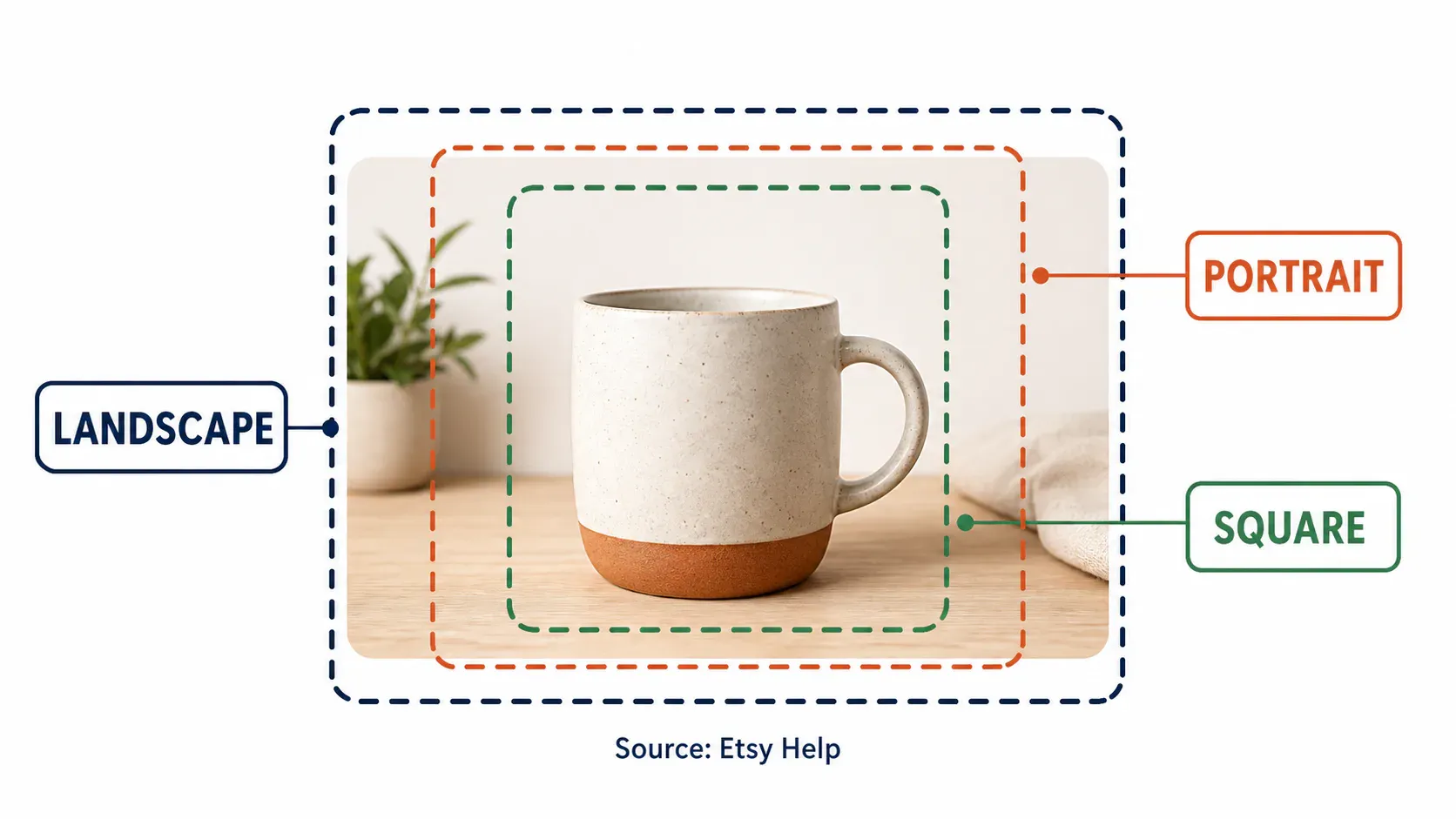
The practical test is simple. Put a square guide over the image, then a taller portrait guide, then a wide landscape guide. If a mug handle, a necklace clasp, or the outer letters of a label touch any guide, back the crop out. I’d rather show a little extra background than make a buyer wonder what disappeared beyond the edge (a little blank space buys a lot of safety).
For listings built around a clean cutout, the same rule applies after background work. Cutouts can make the product easier to read, but they cannot restore a cropped-off corner.
A practical crop workflow
To crop product photos for marketplace thumbnails without making three unrelated files, work from the master outward:
- Open the original in the marketplace editor and inspect the first-photo thumbnail preview.
- Move the product toward the center until its important outline survives the preview, then make the crop slightly looser than feels necessary.
- Save a duplicate for each intended use instead of overwriting the master.
- Use Araluma Crop Image when you need repeatable square, portrait, or landscape preview frames before upload.
- Check the result at phone size. If the product turns into a vague shape, simplify the background or choose a more direct angle.
That fourth step is where browser tools earn their keep. Araluma Crop Image is useful for a small batch because it lets you set the frame deliberately instead of dragging until the subject merely looks centered. For a single listing, the native platform crop remains the better final proof because that’s where the real thumbnail treatment appears.
Need a different source photo rather than a different crop? Shot planning helps you capture a wider hero frame before the editing stage starts. That is often cheaper than trying to rescue a tight original with upscaling or aggressive sharpening.
File size and export checks
Export the crop at the size the listing needs, without enlarging a small original just to hit a number. Etsy notes that enlarging can introduce pixelation, and files over 1 MB may struggle to finish uploading on slower connections. A 2,000-pixel master gives you room to crop, but it is not a reason to add pixels that were never there.
If the file is already sharp but too heavy, Araluma Resize to the chosen dimensions first. Compression is a separate decision; a lower-quality JPEG can hide a soft source for a moment, then fall apart around product edges when the marketplace recompresses it.
Use the square listing-photo guide when a destination commits every listing image to one square shape. Etsy’s three-view preview and a square-only listing both reward the same thing: a product that doesn’t depend on the outer edge of the frame. Its lesson travels well, frame the product for the smallest useful view, then let the bigger display have extra air.
A better first image
The best first image is not necessarily the tightest one. It is the one that still identifies the product after a platform changes the crop, shrinks the card, and places it beside dozens of competing thumbnails. Preserve the roomy master, then replace the hero shot when the essential product detail cannot survive the smallest frame.


