Airbnb Photo Size Guide 2026: Fix the 4:3 to 3:2 Crop
Airbnb asks for at least 1024 x 683 pixels in landscape, which is a 3:2 frame. Here is what that crop costs a phone photo, and the export that survives it.

Contents
- The one number Airbnb publishes
- The 3:2 crop, done before the platform does it
- What the crop actually costs
- The export target the guides skip
- File weight without the guesswork
- When the only copy you have is small
- The cover photo is a different job
- FAQ
- What size should Airbnb photos be?
- Does Airbnb accept portrait photos?
- What is the maximum file size for an Airbnb photo?
- Should I upload the original straight from my phone?
Airbnb publishes one number for listing photos: at least 1024 by 683 pixels, in landscape. That ratio works out to 3:2. The iPhone camera app offers 1:1, 4:3 and 16:9, so a crop is coming either way. The useful move is to make that crop yourself, export the long edge near 2,048 pixels, and land the file around 350 KB.
The one number Airbnb publishes
Airbnb’s photo guidance says listing photos should be “at least 1024px x 683px” and adds that “when in doubt, a bigger photo is better.” The same page states the rule most hosts discover after their first upload: “Photos in search results are all displayed in landscape.”
Now run the division. 1,024 divided by 683 is 1.4993. A true 3:2 rectangle 1,024 pixels wide would be 682.67 pixels tall, so Airbnb rounded to whole pixels and published a 3:2 frame without ever naming it. That reorganizes the job. The pixel count turns out to be the smaller half of the requirement. The shape decides which corner of your room survives, and nobody on the first page of search results mentions it.
Here is the same information as a working table, with the crop each source frame needs.
| What you upload | Pixels | Ratio | After a 3:2 crop | What it costs |
|---|---|---|---|---|
| Phone photo, 4:3 | 3,264 x 2,448 | 1.333 | 3,264 x 2,176 | 272 px of height |
| Phone photo, 16:9 | 4,032 x 2,268 | 1.778 | 3,402 x 2,268 | 630 px of width |
| Phone photo, portrait | 3,024 x 4,032 | 0.750 | 3,024 x 2,016 | 2,016 px of height |
| Airbnb’s published floor | 1,024 x 683 | 1.499 | already 3:2 | nothing |
| The target I recommend | 2,048 x 1,365 | 1.500 | already 3:2 | nothing |
The 3:2 crop, done before the platform does it
Try the phone first, because for a single hero shot the phone is faster than any browser. Apple’s camera guide documents the capture side: “You can choose between 1:1, 4:3, and 16:9 aspect ratios”, reached by tapping Aspect in the camera modes. The same guide puts a grid and a level one toggle away, under Settings, Camera, Grid and Level, which is the cheapest fix for the tilted-horizon look that makes a clean room read as amateur.
Then the crop. In Photos, open the shot, tap the crop tool, and Apple’s instructions are literal: “Crop to a standard preset ratio: Tap , then choose an option such as Square, Wallpaper, 9:16, or 5:7.” Dragging a corner keeps the original ratio until you tap the lock at the top right, which is the step people miss when a reshape refuses to happen.
Two honest limits. The preset picker is a ratio picker and not a pixel field, so there’s no way to type 2,048 by 1,365 and get exactly that file. And it’s one photo at a time, which is fine for a cover shot and tedious at photo fourteen. When you need a pixel-exact frame or a run of them, crop image in the browser and type the ratio instead of dragging toward it.
The mechanics underneath are the ones I walked through for cropping to 4:3, aimed at a wider box: pick the frame first, then let the pixels follow, because a crop that starts from the ratio never stretches anything.
One more thing worth checking before you upload: orientation metadata. A photo that looks upright in your gallery can land rotated in a web form, and the fix belongs in the file, not in the listing editor. I covered a sideways photo separately because it has nothing to do with size and everything to do with getting rejected twice.
What the crop actually costs
I ran the numbers on a real interior shot rather than reasoning about them. The test file was a 3,264 x 2,448 living-room photo, 4 MB straight out of the camera, center-cropped to 3:2 with nothing else touched.
The 4:3 frame lost 272 pixels of height, or 11.1% of the picture. A 16:9 capture at 4,032 x 2,268 loses 630 pixels of width, 15.6%. A portrait shot at 3,024 x 4,032 loses 2,016 pixels of height, which is exactly half the frame.
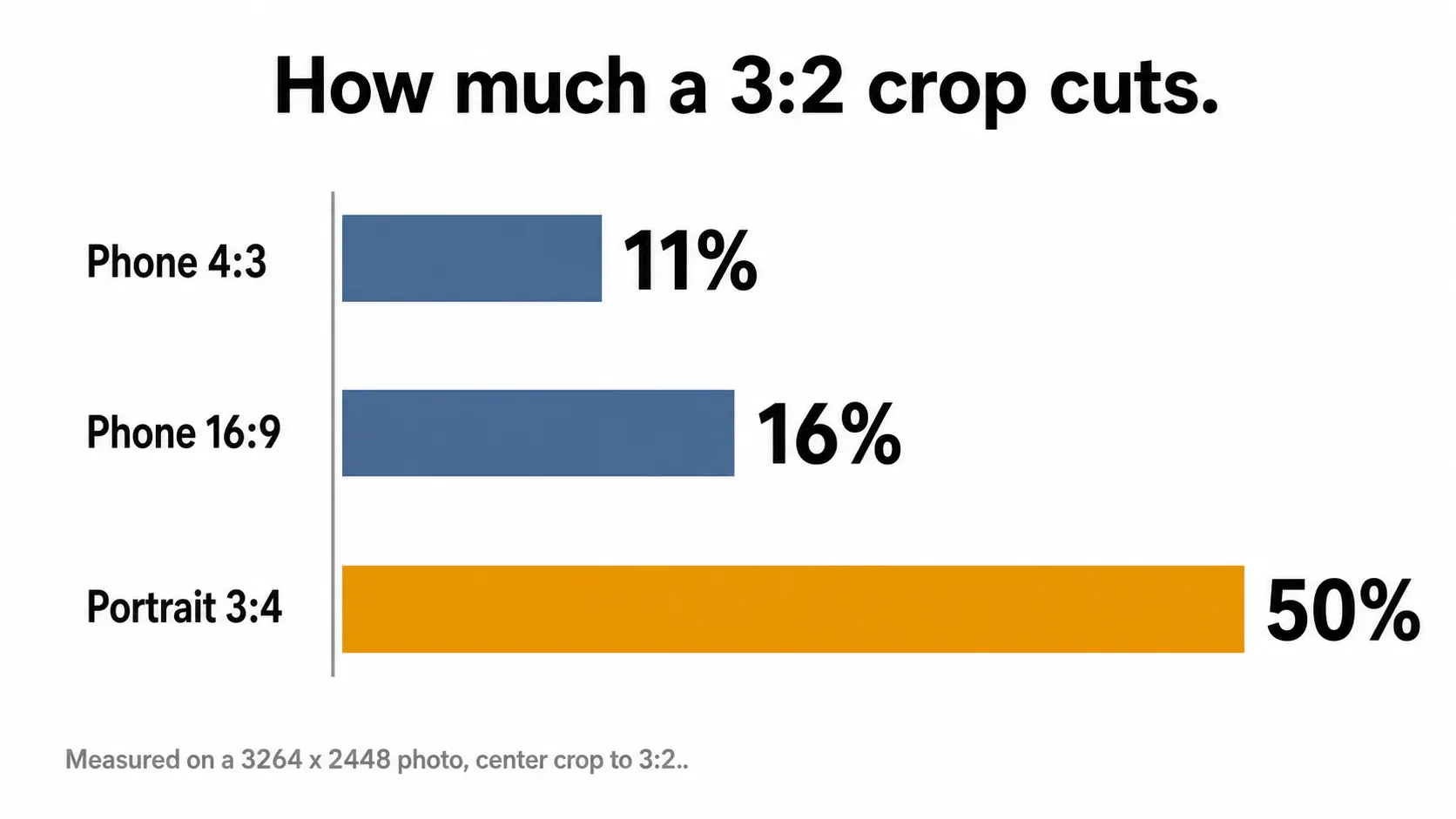
That last row should change behavior. Cropping half the height off a portrait frame produces a different photograph, and the surviving half tends to be the middle of the room rather than the ceiling line or the floor that gave the space its depth. So here’s the position, with the trade-off attached: shoot 4:3 and crop down, rather than shooting 16:9 to “match” the landscape rule. The 16:9 capture already threw away sensor width in camera, and that width is exactly what you want back when a nightstand turns out to be sitting on the crop edge.
The export target the guides skip
Aim for 2,048 x 1,365. Airbnb’s floor of 1,024 x 683 was a generous number for the displays of a decade ago (which topped out around 96 DPI), and it is thin for the screens guests actually browse on. Mozilla’s MDN documentation on devicePixelRatio explains why: a value of 2 is expected for HiDPI and Retina displays, and modern phone screens often yield more than 2. At a ratio of 2, a 1,024-pixel photo has 512 CSS pixels of layout to spend before it starts stretching. The same photo at 2,048 pixels has 1,024.
Doubling the long edge doubles that headroom and quadruples the pixel count, which is why I treat 2,048 as the target and 3,000 as the ceiling worth keeping in the master. Above that you’re storing detail no listing page will ever show. If typing dimensions is where you usually give up, resize the long edge with the ratio locked and let the short edge calculate itself.
Getting to a specific number rather than a vague “bigger” is a habit worth ten minutes once, and the arithmetic behind exact pixel dimensions is the same whether the destination is a listing card or a print.
File weight without the guesswork
Same photo, same 3:2 crop, exported at 2,048 x 1,365 five times with only the quality setting moving. The results:
| JPEG quality | File size | Verdict |
|---|---|---|
| 95 | 781 KB | detail nobody inspects |
| 90 | 483 KB | safe if the room has heavy texture |
| 85 | 353 KB | where I’d stop |
| 80 | 282 KB | fine for secondary rooms |
| 75 | 233 KB | flat walls start to band |
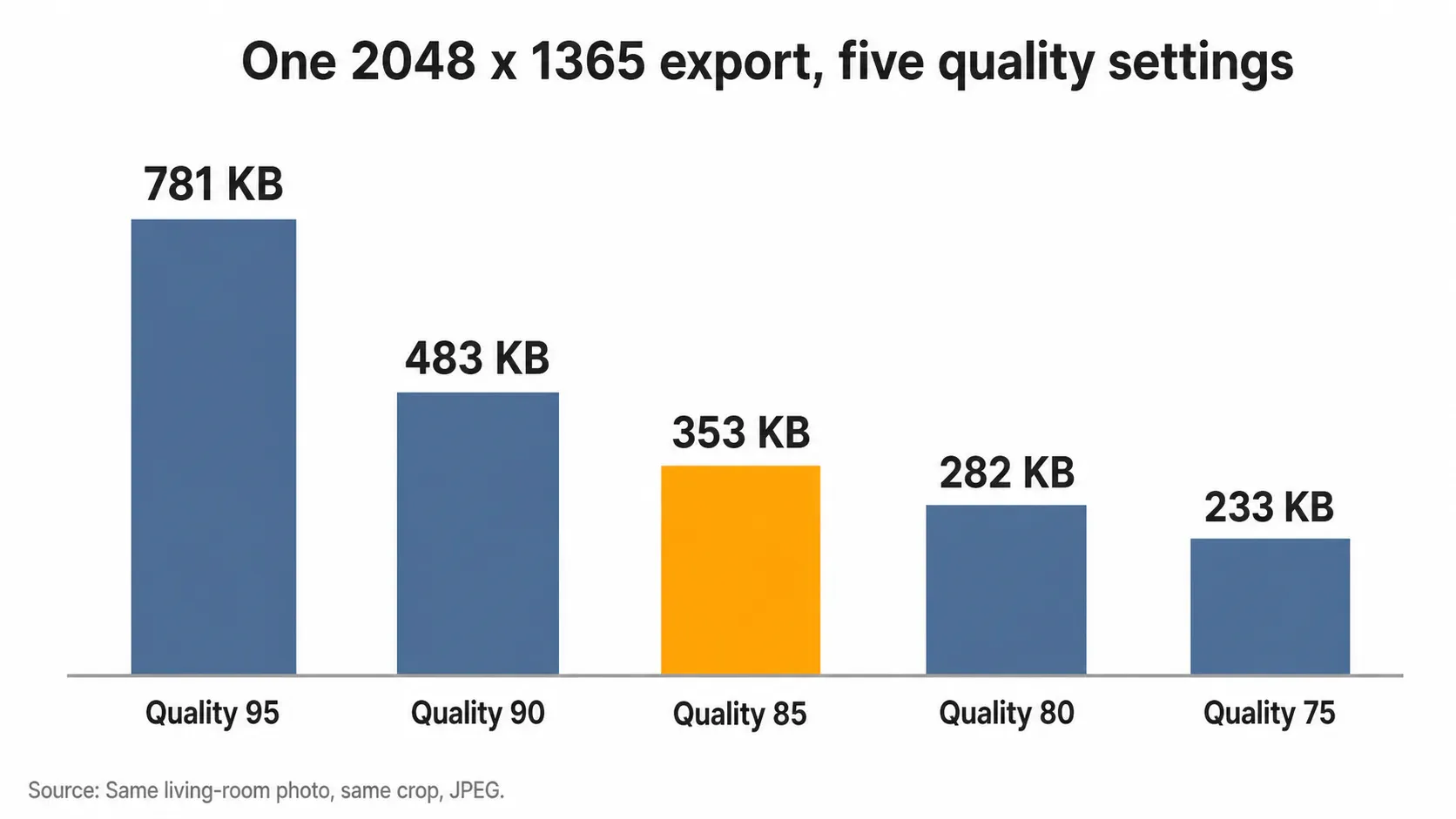
Quality 95 costs 2.2 times the bytes of quality 85 for the same 2,048 pixels. Across thirty photos that difference adds up to roughly 13 MB of transfer that buys nothing a guest scrolling on a phone will notice. Push the same crop down to Airbnb’s minimum instead and you land at 94 KB, which looks like a win on the file-size column and gives back the resolution the display density already spent.
The one case where I’d break my own rule: a room shot into direct window light, where the gradient across a white wall bands early. Those files earn quality 90 (which costs about 130 KB more per photo). Everything else exports at 85 through Araluma Compress, with the live preview open so the banding shows up before the upload does.
Picking a number rather than a slider position is the whole discipline here, and it works the same way when the destination imposes size targets instead of leaving the ceiling open.
One format note before this section closes. Photos pulled straight from an iPhone library can arrive as HEIC files, which not every upload form opens, so a rejected upload usually means the container rather than the size. Transparency has no role in a listing photo either, which makes JPEG the right export every time.
When the only copy you have is small
Sometimes the good photo of the bedroom exists only as a 1,024-pixel export from three years ago. I measured what a rescue actually recovers: I took the 1,024 x 683 file, resampled it back up to 2,048 x 1,365, and compared it against the native 2,048-pixel export made from the full-resolution crop.
Peak signal-to-noise ratio came in at 33.29 dB, which sounds respectable. Edge contrast tells the honest story. Measured the standard way (which reads how sharply pixel values swing at an edge), the native export scored 403.2 and the upscaled copy scored 83.5, so the resample carried back 20.7% of the original edge energy. Four fifths of the crispness stayed lost.
That test used plain resampling, so treat it as the floor rather than the verdict. An AI 2x upscale reconstructs plausible detail and beats plain resampling comfortably on texture like wood grain and rug pile, and it still can’t return pixels the first downscale discarded. Use it when reshooting is impossible, not as permission to keep small masters.
The limits I ran into while upscaling a logo apply here with one difference in your favor: photographs hide reconstruction errors far better than a hard-edged mark does, because there is no straight line for the guesswork to bend.
The cover photo is a different job
Airbnb’s photo tour page is explicit about where the weight sits: “The first 5 photos are the most important because they’re prominently displayed on your listing”, and the first one “is the large one that shows up in search”. Everything above applies to every photo in the set. The cover earns a separate pass.
Crop it looser than feels right. A search card is small, a thumbnail crop can bite further into the frame, and the composition that reads beautifully at full width can turn into a sofa arm and a lamp at card size. My rule for the cover is to keep the subject clear of the outer tenth of the frame, so a tighter downstream crop still lands on furniture rather than on a bare wall. The same safe-zone logic I use for crop product photos transfers directly.
FAQ
What size should Airbnb photos be?
At least 1,024 x 683 pixels, per Airbnb’s own help pages, in landscape orientation. Treat that as a floor. Export at 2,048 x 1,365 instead, which is the same 3:2 shape at double the long edge, and it stays sharp on the high-density displays most guests browse with.
Does Airbnb accept portrait photos?
You can upload them, but Airbnb states that photos in search results are all displayed in landscape. A vertical frame gets reframed to fit, and cropping a 3:4 portrait to 3:2 costs exactly 50% of the frame height. Reshoot horizontally when the room still exists.
What is the maximum file size for an Airbnb photo?
Airbnb’s help pages publish a minimum resolution and no maximum file size, so any specific megabyte cap you read elsewhere isn’t coming from Airbnb. A 2,048 x 1,365 export at quality 85 lands near 353 KB, which uploads fast on hotel Wi-Fi and looks correct at full width.
Should I upload the original straight from my phone?
Only if you enjoy surprises at the crop edge. The unedited 4:3 file in my test weighed 4 MB and still had to lose 272 pixels of height to fit a 3:2 frame. Choosing where those pixels come from is the part worth doing yourself.
The photo worth re-shooting rather than rescuing is the vertical one, because half a frame is a different picture and no crop tool argues its way out of that. Everything else survives a 3:2 trim and a 353 KB export, including the bedroom shot you took in 2023 and have been apologizing for since.


